


Working with data
LI-COR Cloud allows you to export data to a text (.csv) or Excel (.xlsx) file for analysis in other programs or to share with others. You can either download the exported file as needed or schedule it for automatic delivery by email or FTP/SFTP.
Note: If an export contains more than one million data points, LI-COR Cloud divides it into multiple files, each with a maximum of a million data points. The files are compressed into a .zip file and available to download or to send using your data delivery schedule.
Quick export
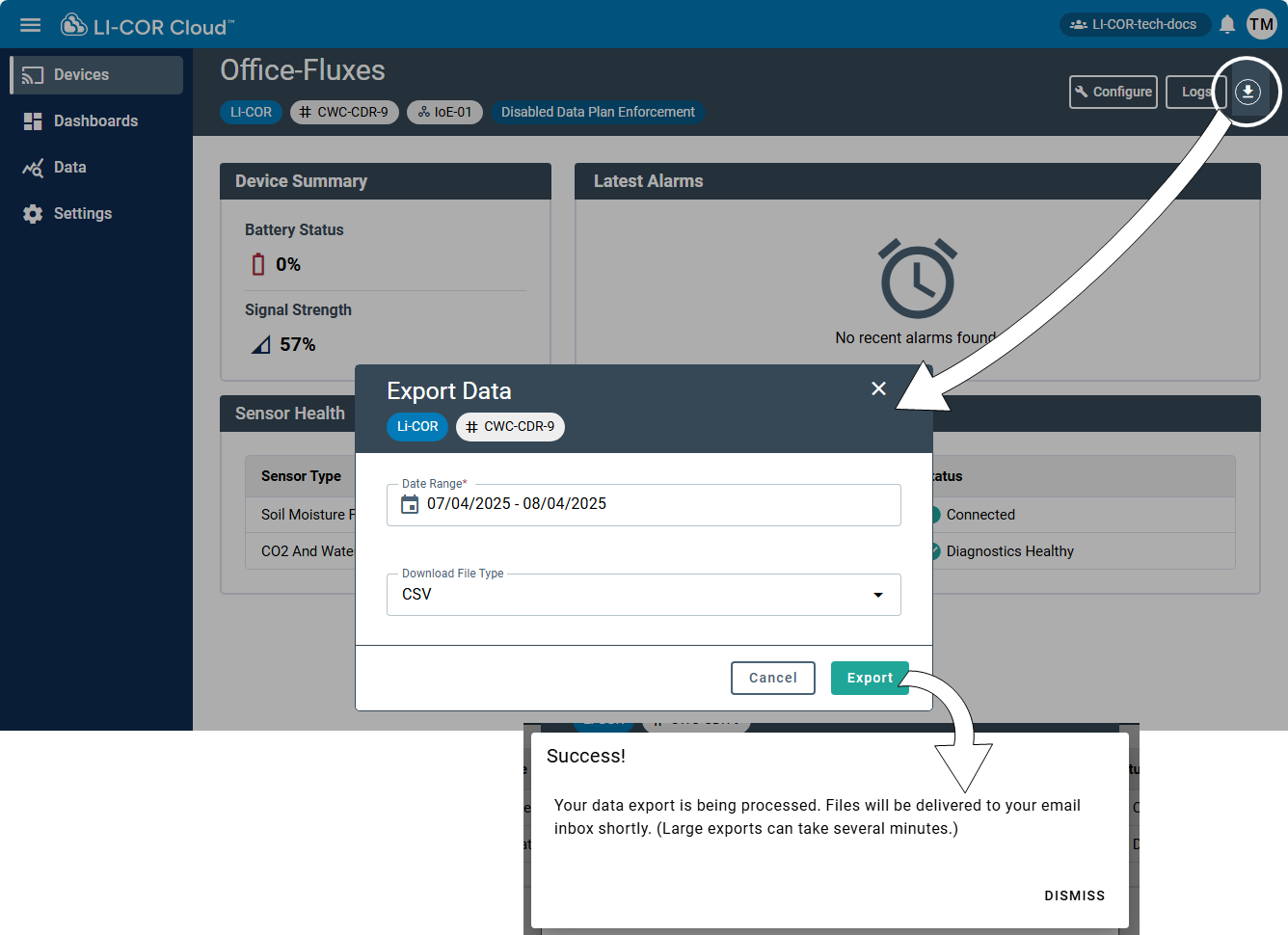
Data from Water Nodes and Carbon Nodes can be transferred simply and automatically with a variety of presets. From the device details page, you have options:
-
Select Date Range: Specify how many days or weeks of data you want to include in the export. Some devices allow custom date ranges.
-
Choose Export Format: Either
.csvor.xlsx.
When the data are prepared, LI-COR Cloud will email the file as an attachment to the address associated with the account.
Other data options
Quick export may be useful for some situations, but the most versatile exports are available from the Data menu, including the following options:
-
See Data feed.